Most "personal" AI assistants still send everything you type to someone else's server. If you want help with your inbox and calendar but would rather not hand your work email to yet another subscription service, you can now run your own AI agent on your own computer.
OpenJarvis is an open-source framework for local-first personal AI, developed at Hazy Research and the Scaling Intelligence Lab at Stanford SAIL. The software is free under Apache 2.0. Cloud models (OpenAI, Anthropic, Google and others) are optional, and if you turn them on you pay those providers at their own rates.
Below: what OpenJarvis does, how to install it the official way, how to set up email, calendar and voice, and the security points you should read first. The GitHub link is at the end.
TL;DR: one official command from the README installs uv, a Python environment, Ollama and a starter model. Then type jarvis. A ready-made preset gives you a spoken morning briefing from email and calendar. Read the security section before you connect your inbox.
WHY A LOCAL AI ASSISTANT
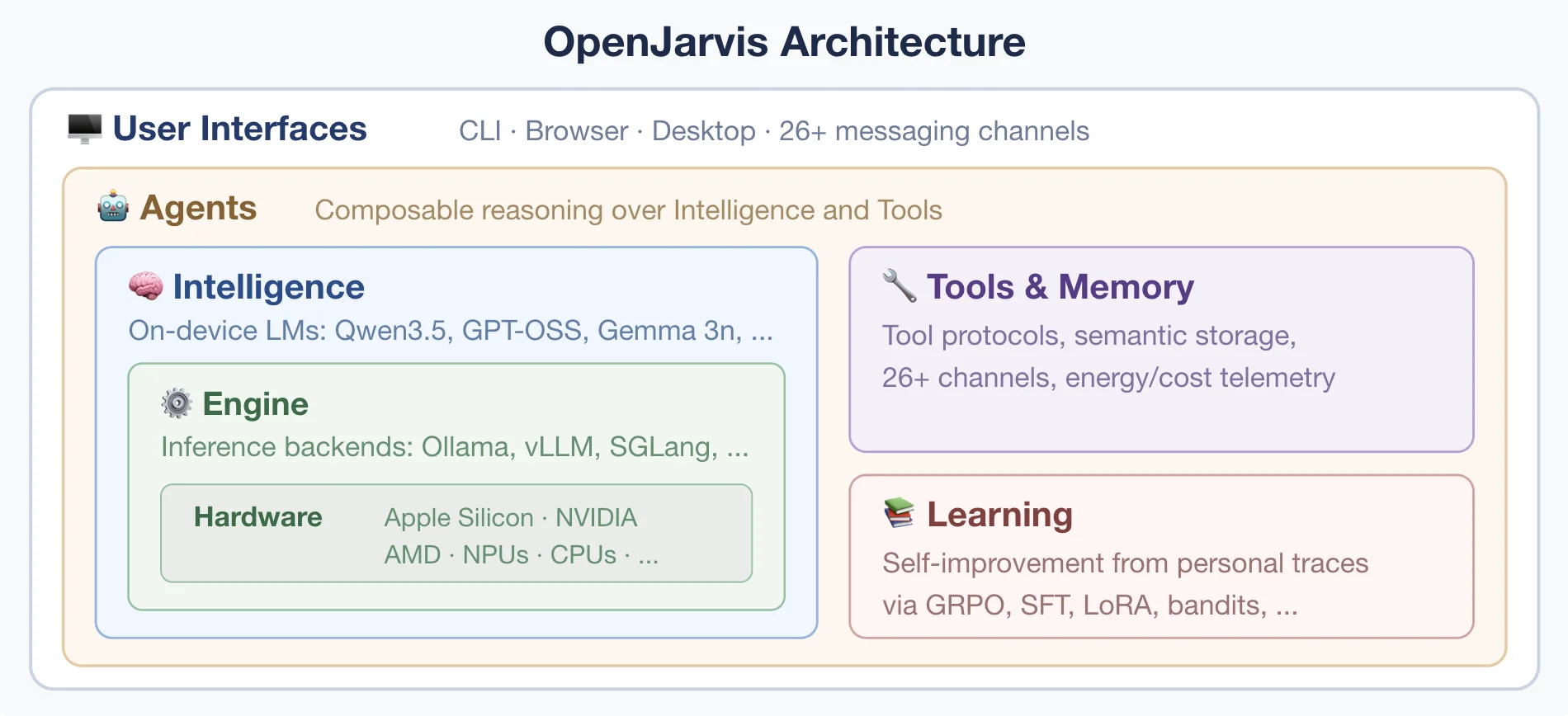
The authors cite their Intelligence Per Watt research: local language models already handle 88.7% of single-turn chat and reasoning queries. OpenJarvis is the software stack that makes local-first personal AI practical, calling the cloud only when it is truly needed.
- Your data stays with you. Config and memory live in your home folder (
~/.openjarvis/). - No subscription for the assistant itself. Your costs are your hardware, disk space and any cloud APIs you choose to add.
- CLI, browser UI and desktop app for macOS, Windows and Linux.
- Actively maintained. As of 20 Nov 2026 the repo has 17k+ stars and 4k+ forks; the latest desktop release is OpenJarvis Desktop 1.0.5 (11 Nov 2026).
PRESETS AND BUILT-IN AGENTS
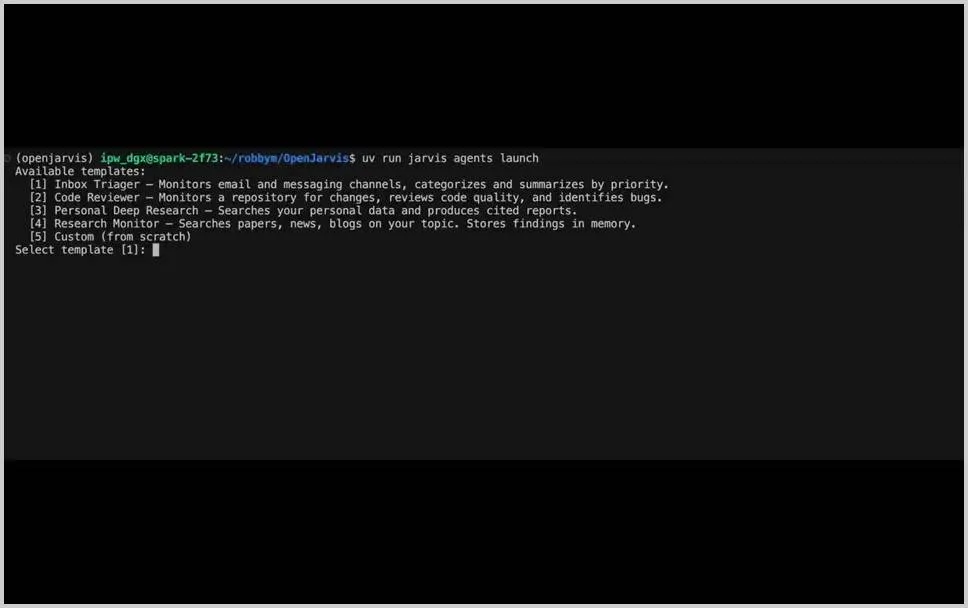
| Preset | What it does |
|---|---|
morning-digest-mac / -linux / -minimal | Spoken daily briefing from email, calendar, news |
deep-research | Multi-hop research across your indexed docs, with citations |
code-assistant | Agent with code execution, file I/O and shell access |
scheduled-monitor | Stateful agent on a schedule, with memory |
chat-simple | Lightweight conversation, no tools |
There are eight built-in agents, from the morning digest to continuous agents with long-term memory, plus a skills system based on the open agentskills.io standard.
WHAT YOU NEED
- A computer on macOS, Linux, WSL2 or Windows. A CPU plus Ollama is enough to start; speed and quality depend on RAM and GPU.
- Disk space for a model: officially from ~1.1 GB (Qwen3.5 2b) to ~14.9 GB (27b).
- Python 3.11–3.13 and an inference engine (Ollama recommended). The installer sets these up.
- Node.js 22+ only for the browser UI (
jarvis gui) from a source checkout.
HOW TO INSTALL (OFFICIAL METHOD ONLY)
Straight from the README. The authors say it takes about 3 minutes on broadband.
# macOS · Linux · WSL2
curl -fsSL https://open-jarvis.github.io/OpenJarvis/install.sh | bash
# Native Windows (PowerShell)
irm https://open-jarvis.github.io/OpenJarvis/install.ps1 | iexDesktop app: .exe / .dmg / .deb / .rpm / .AppImage from the latest release.
Then run jarvis. The Rust extension and larger models keep downloading in the background; jarvis doctor shows status.
Open and skim the script before you run it, and check the domain against the README: only open-jarvis.github.io/OpenJarvis.
SETUP: EMAIL, CALENDAR AND VOICE
The "your assistant names the three emails that matter" scene is the morning digest preset. From the README:
jarvis init --preset morning-digest-mac --force
jarvis connect gdrive          # one OAuth covers Gmail / Calendar / Tasks
jarvis digest --fresh          # generate and play your first briefing
On Linux use morning-digest-linux. The briefing comes with text-to-speech audio, so you can listen instead of read.
Cloud model keys, if you want them, go in environment variables (OPENAI_API_KEY, ANTHROPIC_API_KEY, etc.). Without them, OpenJarvis runs on a local model.
DAILY USE
jarvis            # chat in the terminal
jarvis gui        # graphical interface in your browser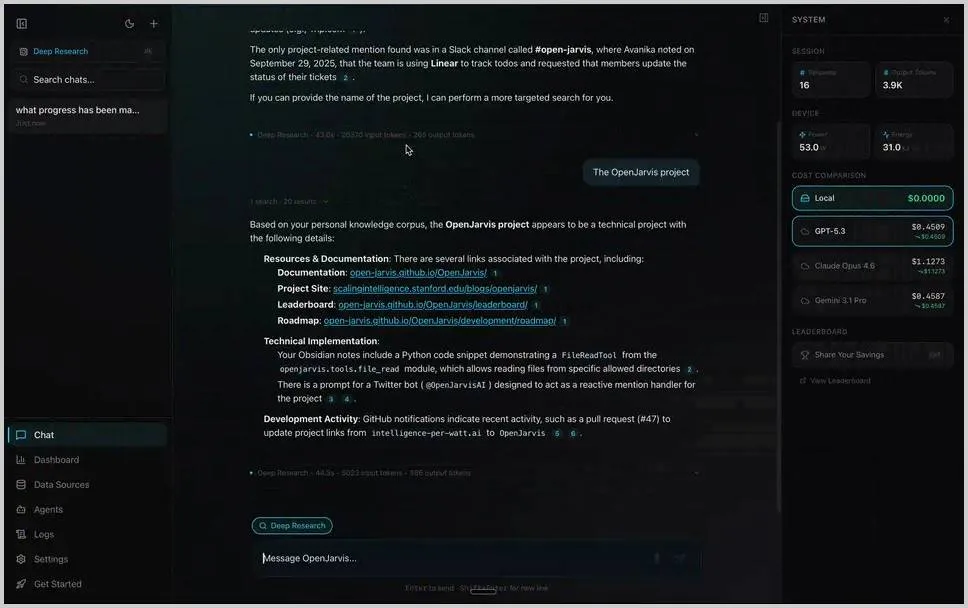
Three things to try in week one:
- Morning briefing from email and calendar, read aloud.
- Research your own documents with
deep-research, answers cite your files. - Track a topic on a schedule with
scheduled-monitor.
SECURITY: READ BEFORE YOU INSTALL
It's a serious, open project, and a few simple habits keep it that way on your machine. OpenJarvis is a real agent: connect email, calendar and shell, and it gets real access to them.
- Install only with the official command from the README or openjarvis.stanford.edu. No third-party "builds". The installer uses
curl | bashand pulls uv and Ollama itself. Open and review the script first, or ask Claude Code to install OpenJarvis using the official command from the README: it shows each step and you approve it. Dependencies (Python, Ollama, a model) still get installed either way. - Least privilege. The agent can get access to your email and shell, so grant only what the task needs. The
code-assistantpreset can execute code and use the shell. Don't enable it on a machine full of work secrets unless you need it. Connect your inbox knowing the agent will be able to read your mail. - Open issue #1332. Reported 18 Nov 2026: the Rust fast path of the
shell_exectool ignores the timeout and environment sanitization, so agent commands can see API keys and tokens stored in environment variables, and exit status is reported incorrectly. It was found by code review, not reproduced at runtime. Status as of 20 Nov 2026: open, no linked fix PR. Until it is fixed, don't keep secrets in environment variables where the agent has shell access. Check the latest status: issue #1332. - Analytics are off by default (opt-in). Connector secrets are stored in
~/.openjarvis/connectors/with restricted permissions. - Third-party skills: be selective. Catalogs with thousands of skills are handy, but every skill is someone else's code.
AN HONEST NOTE ON "FREE"
- The software is free and open source (Apache 2.0). No OpenJarvis subscription.
- Local models cost nothing per request but use disk space and your machine's resources.
- Cloud APIs are optional and paid at OpenAI, Anthropic, Google and other providers' rates.
- A local model on a modest laptop won't match top cloud models. For email triage and briefings it is often enough; add the cloud only where you need it.
GET THE PROJECT
GitHub: github.com/open-jarvis/OpenJarvis
Docs: open-jarvis.github.io/OpenJarvis · project site: openjarvis.stanford.edu · paper: arXiv 2605.17172. Thanks to Hazy Research and the Scaling Intelligence Lab for open-sourcing it.