Claude Code and Codex support four autonomous operating modes that let you hand off a single verified task, an iterative target loop (/goal), a recurring timer (/loop and Desktop), or 24/7 cloud workflows that keep running while your laptop stays closed (/schedule and cloud agents).
Most business owners already pay for subscriptions to LLM models and AI assistants—ChatGPT, Claude, Gemini, Kimi, Manus, Grok, and others—yet still spend hours every week copying prompts, checking incomplete drafts, and typing follow-up corrections. Putting Claude Code or Codex on autopilot works reliably only when each task runs in the loop built for its cadence, paired with a concrete exit check and hard spending limits.
Choosing an autopilot mode comes down to verification and whether your laptop stays open
Turning off manual click prompts and choosing an execution loop are separate controls. In June 2026, the Claude Code engineering team grouped autonomous work into four patterns based on what decision you hand over: a one-off check, a measurable exit condition, a scheduled trigger, or a proactive cloud workflow. Adding permission isolation and spend caps keeps unattended runs from touching sensitive files or running up an overnight bill.
The four Claude Code or Codex loops differ by which decision you hand off to the agent
In Anthropic's engineering guide Getting started with loops (June 30, 2026), Delba de Oliveira and Michael Segner define four loops by which checkpoint you delegate. Confusion often starts with Auto mode, made the default in August 2026: it only clears routine permission clicks inside a single step, while the four loop types decide whether the agent works toward a target score, fires on a schedule, or runs in the cloud.
| Operating mode | Business tasks it fits | Laptop closed | Built-in safeguards | Main risk | When owner input is needed |
|---|---|---|---|---|---|
| 1. Turn-by-turn | Reconciling invoices, lead tables, vendor contracts | No (local session) | Pauses before any final action | Needs a clear verification checklist | Before payout or sending to clients |
2. Goal-driven (/goal) | Raising site score 62 → 90, fixing form checks | No (local session) | Exit metric plus attempt cap | Vague goals spin extra iterations | If attempts run out before hitting target |
3. Scheduled (/loop, Desktop) | Scanning customer reviews and leads every 30 min | /loop and Desktop stop; /schedule runs | /loop expires after 30 days; 1-min minimum | 5-min cache decay raises token cost | Reviewing the queued folder before posting |
| 4. Proactive cloud 24/7 | Overnight checkout and site error recovery | Yes (Anthropic servers) | Isolated claude/ branch, 1-hour minimum | No access to unsaved local files | One morning tap to approve the release |
Turn-by-turn: the agent finishes a single task and pauses before money decisions
In the first mode of Claude Code or Codex, you assign one self-contained job and hand off the verification pass while holding final sign-off yourself. A practical use case is matching a weekly CRM leads table against a contractor invoice across 142 rows. The agent audits every line item and formula total, flags two discrepancies totaling $450, and pauses before payment approval until you confirm or ask for details.
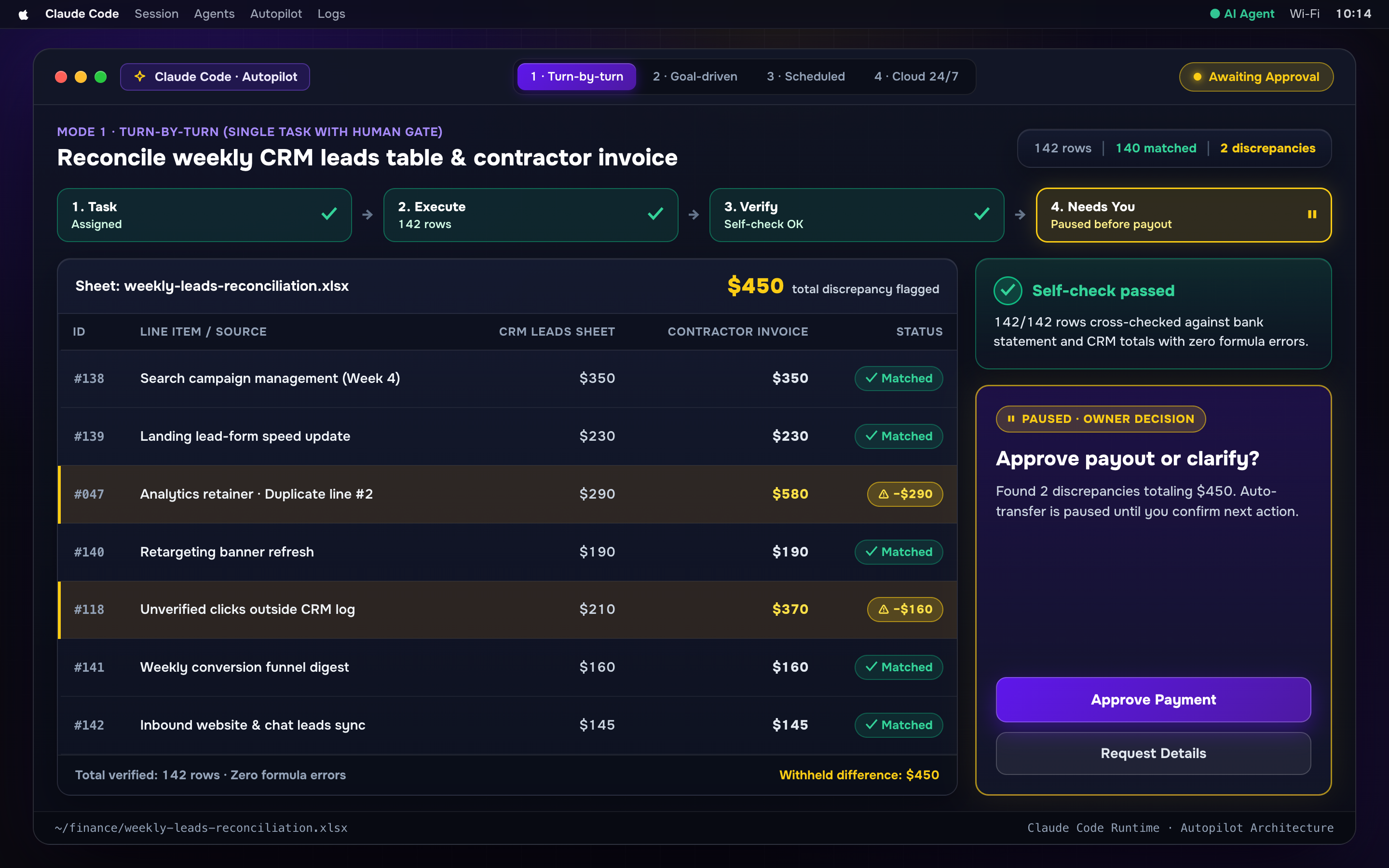
To keep the agent from declaring success early, the Claude Code team recommends saving exact review steps in a reusable SKILL.md file or placing the check directly in your prompt:
Reconcile weekly-leads-reconciliation.xlsx against the exported CRM leads table.
Verify every row sum, flag duplicate retainers, and confirm zero formula errors.
Pause and list any mismatched lines for my decision before approving payout.
Goal-driven: /goal keeps iterating until an independent model confirms your metric
The second mode in Claude Code or Codex starts with /goal whenever you want a verified metric at the finish line. According to the Claude Code `/goal` documentation (November 24, 2026), after every turn a separate evaluator model checks your completion rule against the live session output and starts the next iteration automatically until the target holds.
For marketing teams, this solves wasted ad clicks caused by slow landing pages. Starting from a baseline performance and conversion score of 62 out of 100, the agent compresses hero assets, defers blocking scripts, sharpens the headline and primary form, and lifts the score to 91 on attempt 4 of 5 before stopping automatically.
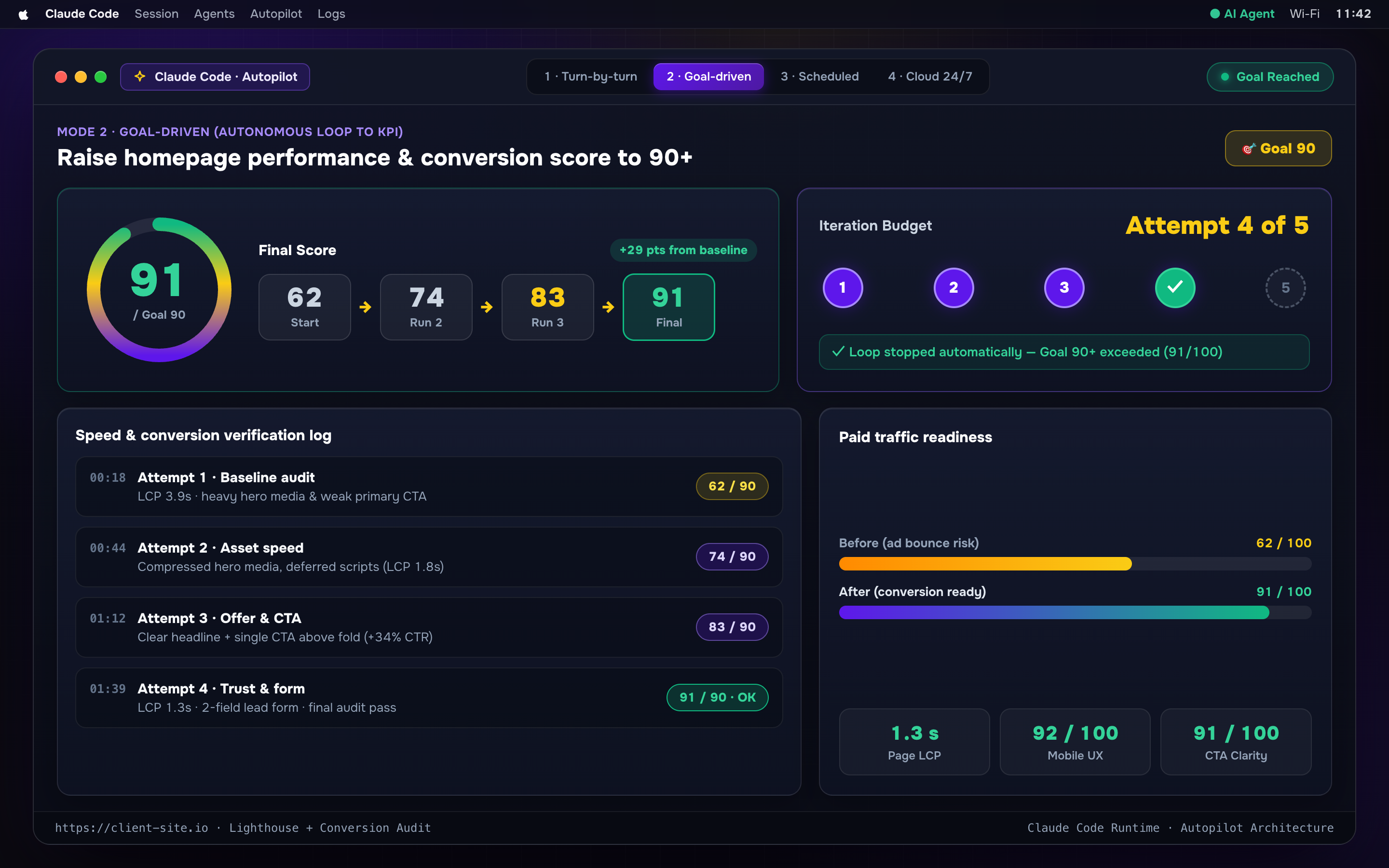
Before running /goal, toggle terminal permissions with Shift+Tab to auto mode (or start with claude --permission-mode auto) and place the attempt limit directly inside the goal prompt:
/goal Raise mobile homepage performance score to 90 or higher.
Report the updated score and LCP time after each change.
Stop after 5 tries even if the score is not there yet and explain what blocks it.
Run /goal with no arguments to inspect the active goal status, or /goal clear to cancel the loop early.
Scheduled: /loop, Desktop, and cloud /schedule behave differently when your laptop closes
The third mode in Claude Code or Codex handles recurring operational chores that teams drop during busy weeks. For example, every 30 minutes the agent scans fresh customer reviews and inbound leads across your website, Instagram, and Telegram, selects verified five-star quotes, and drops three ready Stories cards into /stories-ready/ for the content workflow while remaining blocked from publishing anything on its own.
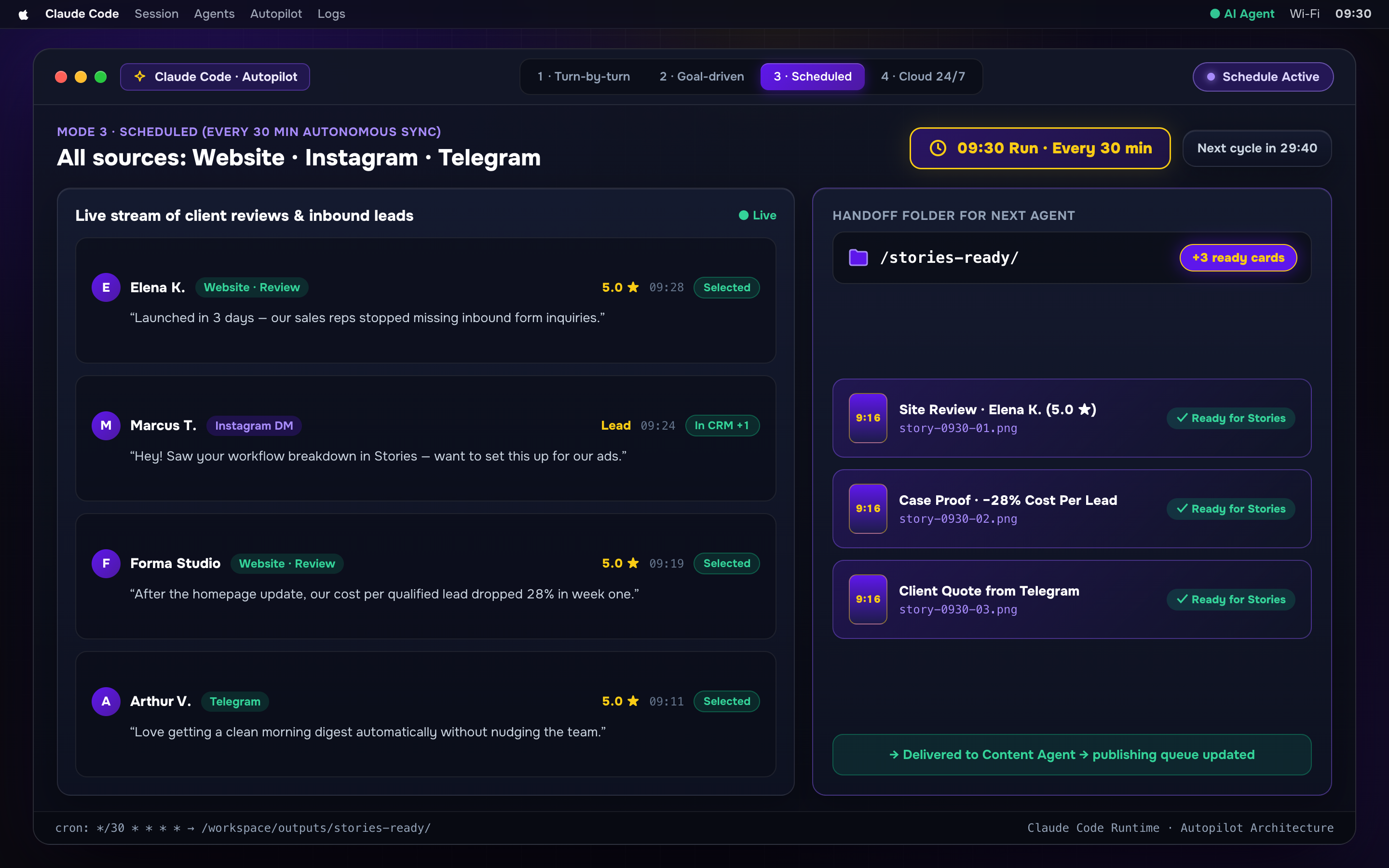
Per Anthropic's scheduled tasks documentation (November 24, 2026), the three scheduling options behave differently once you close your computer:
- Terminal `/loop`: runs only inside an open session on your machine, with intervals starting at 1 minute. Since
v2.1.330, recurring loops auto-expire after 30 days (up from 7 days), and settingCLAUDE_CODE_DISABLE_CRON=1stops all local timers immediately. - Claude Desktop scheduled tasks: configured under
Code → Scheduled → New taskusingOnly on this computerand an isolatedWorktreeto protect active drafts. Your laptop must stay awake; if it slept past a run, Desktop executes one catch-up pass covering the prior 7 days. - Cloud `/schedule` tasks: execute on Anthropic servers while your laptop is shut, starting at 1-hour intervals against committed repository files only.
For quick session polling or a reusable .claude/loop.md prompt, use a structured instruction like this:
/loop 30m Scan fresh customer reviews and inbound website or messaging leads from the last 30 minutes.
Save approved review cards into /stories-ready/ and summarize any complaints separately.
Never publish anything live on your own. If nothing new arrived, reply only with "all quiet".
Proactive cloud 24/7: three separate roles catch issues, fix them, and wait for sign-off
The fourth mode in Claude Code or Codex runs on cloud infrastructure on hourly schedules or triggers even when your laptop sits closed in your bag. Under Cloud Scheduled Tasks documentation (November 23, 2026), cloud runs create changes on a dedicated claude/ branch so your live main code stays untouched until human approval.
At full maturity, this mode splits execution across three independent agents, as introduced in Introducing Claude Ship (November 23, 2026). At 03:14, a bug-catcher agent flags a phone-field validation crash blocking checkout step 2; a fixer agent patches the international phone mask on a separate branch without downtime; a verifier agent runs 12 desktop, mobile, payment, and analytics checks; and at 08:02 you see a mobile summary waiting for one tap on Approve Release.
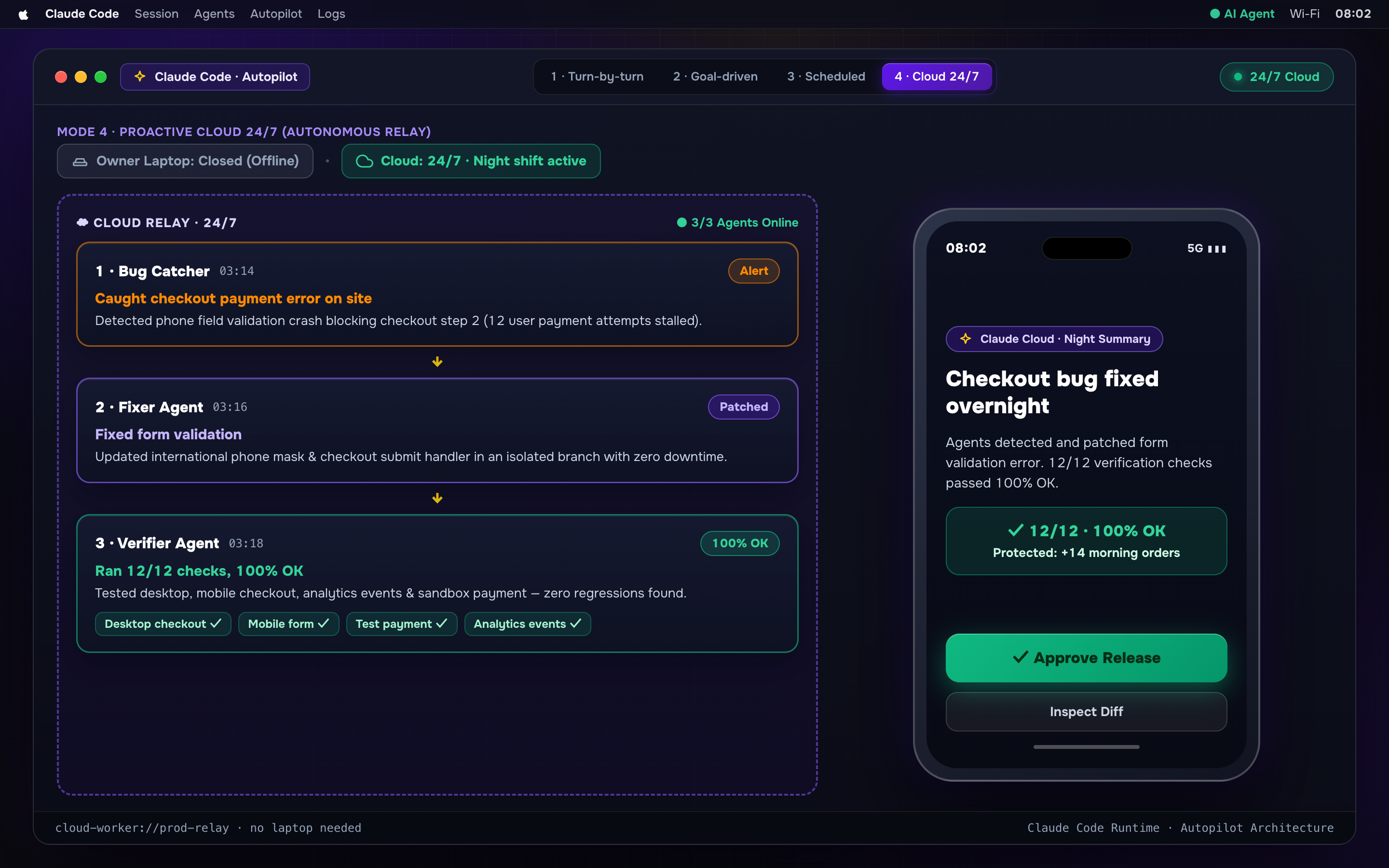
Inside Anthropic's own Claude Code engineering team between June and September 2026, adopting this three-agent flow more than doubled merged pull requests and cut rollbacks by over 40%, while Rakuten reduced feature shipping time by 79%, down from 24 days to 5 days (Introducing Claude Ship, November 23, 2026).
To plan a change locally first and hand execution over to the cloud, pair planning mode with --cloud:
claude --permission-mode plan
claude --cloud "Execute the agreed plan: watch checkout error logs, patch failures on a claude/ branch, and run all 12 verification checks without touching main."
Automated safety filters catch more risks than manual clicks while spend caps protect the budget
Founders often worry that turning off manual confirmations makes dangerous mistakes more likely. In Anthropic's blind study of 1,053 paid testers published on August 7, 2026 in Making auto mode the default in Claude Code, participants clicked through 97% of permission prompts out of habit and caught a dangerous command only 13.6% of the time (143 out of 1,053, dropping from 17% early in a session to 5% after 50+ prompts). In the same test, Auto mode blocked 89% of dangerous commands (937 out of 1,053).
Anthropic's earlier technical report, Claude Code auto mode research (March 25, 2026), states the real-world boundary openly: across live sessions (n = 52), the classifier still missed 17% of overeager agent actions (and 5.7% across 1,000 synthetic data exfiltration tests). Furthermore, per Claude Code sandboxing documentation (November 20, 2026), /sandbox locks down file writes and network access by default, yet still allows reading most of the machine, including ~/.ssh and ~/.aws/credentials, unless you restrict those paths explicitly via filesystem.denyRead.
Spending controls matter in Claude Code and Codex just as much as file permissions. According to Anthropic's Manage costs effectively guide (updated November 23, 2026), enterprise usage averages around $13 per active day per user ($150 to $250 per month) and stays under $30 per active day for 90% of users. Frequent interval polling such as /loop 30m introduces a hidden 5-minute prompt cache trap: once a 30-minute pause clears the cache, the model re-reads the entire conversation history at full rate. In a viral Reddit r/ClaudeAI thread (March 1, 2026), an unattended /loop 30m session running on Opus grew to roughly 800,000 tokens and burned about $6,000 in roughly 26 hours.
For background scripts and automated checks, Anthropic's CLI reference (November 24, 2026) enforces strict turn and dollar ceilings:
claude -p "Summarize fresh website leads and flag discrepancies" \
  --max-turns 25 \
  --max-budget-usd 2.00 \
  --permission-mode dontAsk \
  --allowedTools "Read,Grep"
In our own setups, for instance, systems monitor ad campaigns 24/7 to prevent budget waste while separating anomaly detection, output verification, and final business decisions across distinct steps: the agent flags rule violations immediately, yet never loops indefinitely on an open-ended task. In practice, wasted token bills almost always trace back to vague prompts like "improve the page" with no numeric check, causing the agent to improvise every turn until a human steps in.
Starting with one measurable task locally prepares a workflow for cloud automation
Answer three direct questions before choosing which Claude Code or Codex loop fits an operational workflow:
- Does the task repeat on a fixed schedule? One-off reviews belong in turn-by-turn mode, whereas half-hour review monitoring needs a timer.
- Can a clear number or test verify completion? Whenever a concrete threshold applies (such as score 90+ or passing checkout checks), choose
/goalwith a capped turn count. - Must the workflow run while your computer is off? Keep Desktop tasks for local spreadsheets and move vetted overnight monitoring into cloud
/scheduleruns.
Follow this five-step checklist before rolling out autopilot loops across marketing or operations:
- Write strict project boundaries in
CLAUDE.md, including an explicit rule against live publishing or payouts. - Enable
/sandboxand block credential directories usingfilesystem.denyRead. - Cap every loop with an attempt limit inside
/goalor--max-turnsand--max-budget-usdflags in CLI scripts. - Spend the first week in turn-by-turn and
/goalmodes with your team; if non-technical staff still struggle to write clear tasks for models, see how structured diagnostics work in our guide to the LearnHarness AI learning system. - Move a workflow into cloud
/scheduleonly after local runs pass consistently.
When one-off prompts or plain scripts beat four Claude Code or Codex autopilot loops
Anthropic's scheduled tasks guide (November 24, 2026) advises against multi-step reasoning loops whenever a deterministic script handles the job, because running a fixed script is cheaper and predictable.
Cloud /schedule tasks also fail for workflows that rely on unsaved files on your desktop or local desktop software, since cloud workers start from a clean repository clone. Tasks lacking an objective exit check or safe credential boundaries should stay under direct human execution.
Frequently Asked Questions
Which of the 4 Claude Code or Codex autopilot modes should a non-technical founder try first?
Start with turn-by-turn execution for one-off tasks where you want to inspect the output before any final commitment. Move next to /goal with a measurable target and an attempt limit ("stop after 5 tries") using Shift+Tab auto mode, and add scheduled or cloud loops only once a recurring workflow proves reliable.
How do you stop the agent from saying "done" halfway through instead of reaching a real site metric or form check?
Set a measurable exit condition and proof rule inside /goal, such as reaching a mobile score of 90+ or passing all checkout form tests. After each turn, a separate fast evaluator model checks the session transcript and sends the agent back to work automatically until the condition holds or your attempt cap runs out.
What happens to autopilot loops when you close your laptop lid: which modes stop and which keep running 24/7?
Local /loop timers live only inside an open terminal session and stop on exit, while Desktop scheduled tasks require your computer to stay awake. Only Cloud Scheduled Tasks (/schedule) run 24/7 on Anthropic servers while your laptop is shut, starting at 1-hour minimum intervals on a fresh repository clone.
How much does Claude Code autopilot cost in practice, and how do you prevent a runaway bill overnight?
According to Anthropic cost documentation (updated November 23, 2026), enterprise usage averages around $13 per active day per user ($150 to $250 per month) and stays under $30 per active day for 90% of users. Hard caps on agentic turns (--max-turns), maximum dollar spend (--max-budget-usd), and lighter models for routine checks protect against overnight loop spikes.
Is it safe to turn off manual approval prompts without risking deleted files, leaked keys, or a broken website?
In Anthropic's blind study of 1,053 testers, humans approved 97% of prompts out of habit and caught only 13.6% of dangerous commands, while Auto mode blocked 89%. Even so, the classifier missed 17% of overeager actions in real sessions, so critical workflows still need /sandbox with filesystem.denyRead for credentials and isolated branches awaiting human sign-off.
When are the four Claude Code or Codex autopilot modes overkill compared to a standard chat or a plain script?
Skip multi-step autopilot loops for vague one-off questions that lack an objective check, or for rigid deterministic tasks where a standard script is cheaper and predictable. Cloud runs also do not fit workflows that depend on unsaved local files or desktop software on your machine.
Reliable AI autopilot rests on verifiable exit checks and strict spend caps
Claude Code or Codex automation pays off when every recurring task sits in the right execution loop, carries an objective completion rule, and runs behind sandboxed paths and firm spending limits. Set the verification criteria, dollar cap, and human sign-off gates before leaving any workflow unattended.
I am Ievgen Kovalevskyi, a developer of AI systems and autonomous AI agents for business and marketing. The production systems we build monitor ad campaigns 24/7 to prevent budget waste, automate content and operational pipelines, and bring in clients at scale; you can commission a custom multi-agent setup on the AI Business Ecosystem service page or start by mapping your workflow in a Diagnostic Session.
Practical video breakdowns of AI workflows go out on @GoAdSmart. To receive the step-by-step setup playbook for all four Claude Code autopilot modes, comment or message the word AUTOPILOT.