In short: In late September 2026, Google removed campaign-level language targeting from Search campaigns — Google itself now decides the serving language from your ad copy and landing page. Single-language campaigns are unaffected, but bilingual markets should check their reports: budgets can quietly leak into irrelevant traffic.
In late September 2026, Google removed one of the oldest toggles in campaign settings. Most advertisers never even noticed — and they should have.
What happened
In late September 2026, Google removed campaign-level language targeting from Search campaigns. The official "About language targeting" help article has been updated to reflect the new behavior.
You used to tell the system: "show ads to people with Ukrainian as their language" — or English. That toggle is gone. Google now decides which ad to show to whom based on the language of your ad copy and landing page, combined with its own signals about the person: query language, user settings, and other language signals derived by Google's AI.
What changed by campaign type:
- Search campaigns: the campaign-level language setting is removed entirely. Serving follows automatic language matching.
- Performance Max: the setting no longer applies to ads shown on the Google Search Network (those behave like standard Search campaigns now). But your selected languages still apply to YouTube, Display, Discover, and Gmail.
- Shopping ads are not affected by language settings at all.
- Existing single-language campaigns keep working as before — according to Google, no advertiser action is required.
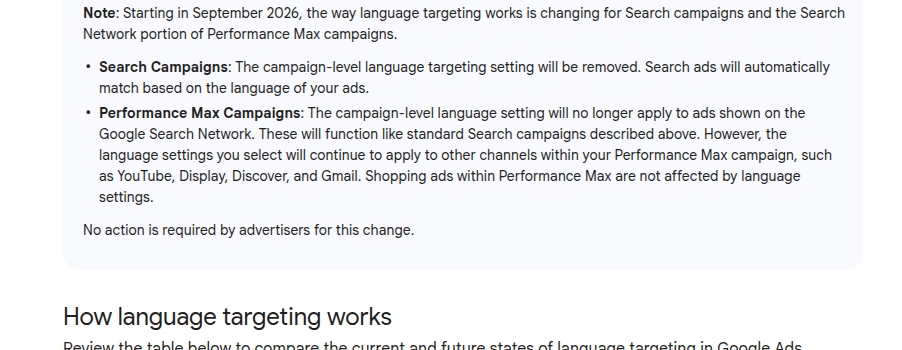
*Screenshot of the official Google Ads Help: "The campaign-level language targeting setting will be removed."*
What it means in practice: three insights
1. Bilingual markets are the risk zone. If your customers speak two languages — say, Kazakh and Russian in Kazakhstan, or you sell to immigrants in Europe — you used to separate audiences with the language setting. Now the line runs through the language of your ad and your site. Check who your impressions actually reach: language reports are still there, but manual control is gone.
2. Your ad copy became a targeting setting. Want a Russian-speaking audience? Write the ad and the landing page in Russian, and Google will match people who understand Russian. The nuance: multilingual users may see an ad in a different language than the one they searched in — if Google is confident the person will understand the ad's language. Your negative keywords and campaign structure were not built for this — review them.
3. Every update like this costs someone money. I have been in advertising since 2009 and watched dozens of "harmless" interface changes quietly sink conversions for some advertisers while budgets started leaking into irrelevant traffic. This update is cut from the same cloth: nothing broke, the steering just got a little less responsive.
Three things to check right now
Check 1 — reports. Open the language report and search terms for the last 30 days: are there impressions in a language you do not need? In the cheat sheet — section 1: exactly which reports to open and how to read the language column to scope the problem in 5 minutes.
Check 2 — campaign structure. If you run two languages, campaigns are now split by the language of ad texts and landing pages, not by a setting. In the cheat sheet — section 2: how to rebuild the structure without losing statistics and which settings to verify in each campaign.
Check 3 — Performance Max. Check where impressions actually serve: the Search Network now lives by new rules, other channels by old ones. In the cheat sheet — section 3: a post-update PMax checklist, including what Google mentions only in passing in the help article.
Get the cheat sheet: what to check in your account after the update
I put together a short cheat sheet — a step-by-step checklist for auditing your ad account after the language setting removal. Inside:
- which reports to open and how to read the language column;
- how to rebuild bilingual campaign structures without losing statistics;
- a post-update Performance Max checklist.
FAQ
What exactly did Google remove in September 2026? Campaign-level language targeting in Search campaigns. Serving now follows automatic matching: Google looks at the language of your ad copy and landing page plus its own signals about the user.
Do existing campaigns need restructuring? No. Single-language campaigns keep working as before — Google explicitly says no advertiser action is required. Only bilingual campaign structures and negative keyword lists deserve a review.
How do I target the right language now? Through the language of your ad texts and landing page. Write the ad in Russian and Google matches people who understand Russian. For two languages, split campaigns by text language, not by a setting.
Sources
- Google Ads Help, "About language targeting" (updated for the September 2026 changes): https://support.google.com/google-ads/answer/1722078